Astra Theme Review in 2026 – The Perfect Blend of Speed and Design?
Astra Theme Review in 2026 – The Perfect Blend of Speed and Design? If you’ve been exploring lightweight and customizable WordPress themes, Astra is likely the first name that comes up. Known for its lightning-fast performance and unmatched versatility, Astra continues to lead the WordPress ecosystem in 2026 as the go-to choice for website creators, agencies, and bloggers alike.
WordPress Development Services
With over 1 million active installations and more than 6,000 five-star reviews, Astra’s success is no accident. It’s designed with a clear focus on speed, design flexibility, and compatibility with leading page builders like Elementor, Spectra, and Gutenberg. Whether you’re building a personal blog, an eCommerce store, or a client website, Astra delivers a seamless blend of performance and creativity.
In this Astra Theme Review 2026, we’ll explore why this theme continues to dominate WordPress — offering the perfect balance between lightweight structure, beautiful customization, and developer-friendly features that make it a top contender for any modern website.
Astra Theme Review in 2026
1: What is Astra Theme?
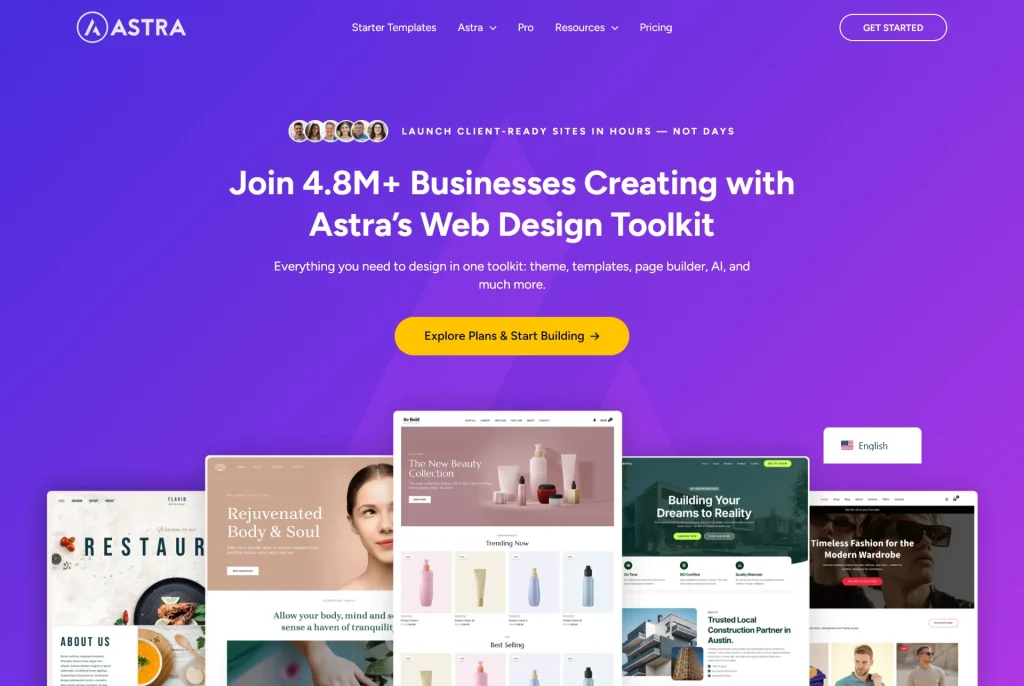
Astra is a lightning-fast and highly customizable WordPress theme developed by Brainstorm Force. Trusted by over 1 million users, it’s ideal for bloggers, businesses, agencies, and e-commerce store owners. Astra’s free version delivers speed, a clean design, and SEO-friendly performance, while Astra Pro unlocks advanced features such as custom layouts, sticky headers, WooCommerce tools, and white-labeling.
Built to work seamlessly with major page builders such as Elementor, Beaver Builder, Bricks, Gutenberg, and Spectra, Astra gives users complete design freedom without slowing down their websites. Whether creating a personal blog or a professional client site, Astra remains one of the most powerful and reliable WordPress themes in 2026.
2: Astra Theme Downloads Per Day
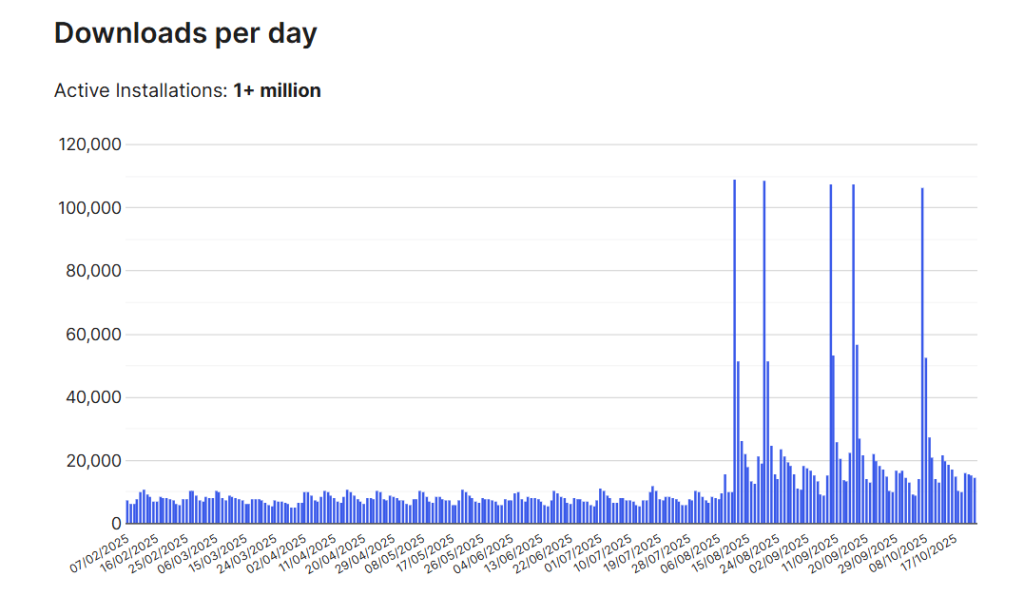
The Astra WordPress Theme records thousands of downloads daily, proving its lasting popularity and trust within the WordPress community. With 1+ million active installs and consistent growth, Astra remains a top choice for fast, customizable, and SEO-friendly websites. Its steady download rate reflects strong user satisfaction, frequent updates, and compatibility with leading page builders — making it one of the most reliable themes for bloggers, businesses, and agencies in 2026.
3: Astra’s Performance in 2026
The Astra WordPress Theme continues to dominate in 2026 for its unmatched speed and lightweight design. With a core size of under 50KB, Astra ensures ultra-fast loading times that enhance both SEO performance and user experience. Built with clean code, optimized schema markup, and minimal HTTP requests, it’s fully CDN-ready, making it ideal for global websites.
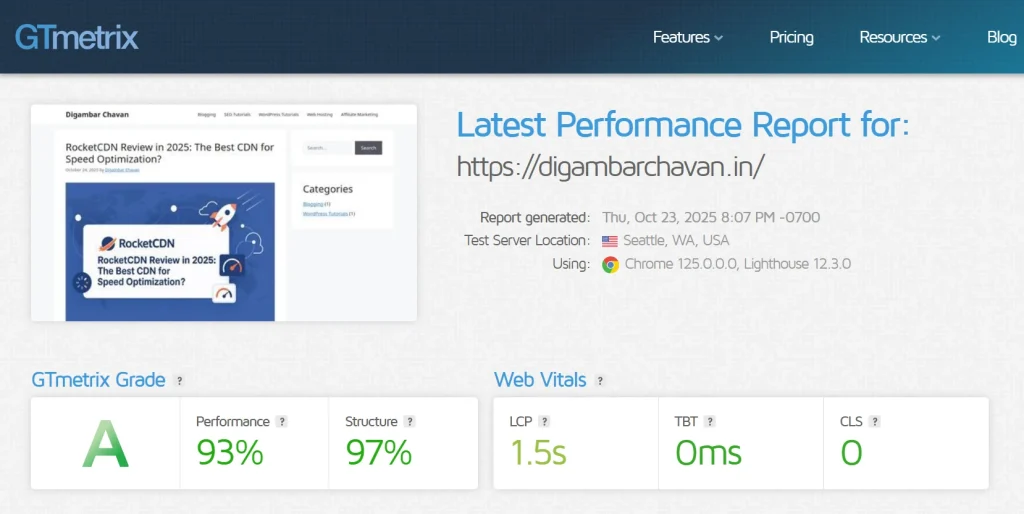
Recent updates have improved Core Web Vitals, resulting in higher scores for LCP, TBT, and CLS, ensuring smoother browsing and top rankings. In a GTmetrix test, Astra-powered sites achieved 93% performance and 1.5s load time, proving their efficiency. Whether for blogs, stores, or agencies, Astra delivers speed, stability, and SEO excellence in every build.
4: Astra Free vs Astra Pro (2026 Comparison)
The Astra Theme remains a top WordPress choice in 2026 for speed, flexibility, and design control. While Astra Free is perfect for beginners, Astra Pro unlocks advanced features ideal for professionals and agencies.
| Feature | Astra Free | Astra Pro |
|---|---|---|
| Performance | Lightweight (Under 50KB) | Optimized + Faster |
| Header & Footer | Basic | Advanced, Sticky, Transparent |
| Blog Layouts | Standard | Grid, Masonry, Custom |
| WooCommerce | Basic Support | Quick View, Gallery, Infinite Scroll |
| Custom Layouts | Limited | Full Layout & Hook Control |
| Mega Menu | – | Included |
| White Label | – | Included |
| Starter Templates | Basic | 240+ Premium |
| Page Builders | Elementor, Gutenberg | + Beaver, Bricks |
| Support | Community | Priority |
Verdict: Astra Free is great for beginners, but Astra Pro offers unbeatable customization, WooCommerce tools, and design freedom — making it the smarter choice in 2026.
5: New Features & Updates in 2026
The Astra Theme continues to evolve in 2026 with updates that focus on speed, accessibility, and modern design flexibility. Recent changelog releases highlight major improvements, including enhanced accessibility compliance, WooCommerce performance upgrades, and a faster, smoother UI inside the WordPress customizer.
Astra now supports Dark Mode, Spectra Pro integration, and full compatibility with Gutenberg 3.0+, offering users an optimized block editing experience. Developers will appreciate better layout control, schema markup improvements, and faster site rendering across devices.
These consistent updates prove that Astra remains future-proof, continuously adapting to WordPress trends while maintaining its signature speed, reliability, and SEO performance — making it the ideal choice for modern website creators in 2026.
6: Design Flexibility and Starter Templates
Astra’s design flexibility and Starter Templates make it one of the most user-friendly WordPress themes in 2026. With over 200+ ready-to-use templates, Astra offers professionally designed options for blogs, agencies, portfolios, restaurants, and eCommerce stores. Every template is fully responsive and can be launched with an easy one-click import, allowing users to build websites in minutes rather than hours.
Quick one-click import — Step-by-step
- Install Astra & Starter Templates
- In WordPress, go to Appearance → Themes and install/activate Astra.
- Install the Starter Templates / Astra Sites plugin if prompted.
- Open the Starter Templates wizard
- From the admin notice or Appearance → Starter Templates (or Astra → Starter Templates), click Get Started.
- Choose how you want to build
- Pick AI Website Builder (if available) or Classic Starter Templates, depending on whether you want AI-assist or ready templates.
- Click Build with Templates (classic) or Build with AI to continue.
- Select site type & page builder
- Choose your website type (Business, Blog, eCommerce, etc.) or use the search box.
- Select a page builder: Block Editor (Gutenberg) or Elementor. Astra will recommend the required plugins for your choice.
- Pick a template
- Browse the library (200+ templates). Hover a preview and click Import or Use this template on the one you like.
- Confirm features & required plugins
- The wizard shows features (Page Builder, Contact Form, eCommerce, etc.) and the plugins that will be installed (Elementor, WPForms Lite, Ultimate Addons, SureCart, etc.).
- Tick only the features you want, then click Continue.
- Customize starter options
- Choose font pair, color palette, and site logo (optional) in the small customizer panel that appears.
- Confirm you understand the import may overwrite settings (Astra warns you) and proceed.
- One-click import
- Click Submit & Build My Website or Import. The wizard installs plugins, imports demo content, configures menus, and applies styles automatically.
- Wait for the progress to reach 100% (this usually takes under a minute). Then click View Your Website.
- Finish setup
- Review pages, edit content with Elementor or the Block Editor, and use the Customizer for global changes (Colors, Typography, Header).
- Remove demo posts/pages you don’t need and replace images/text with your content.
7: WooCommerce Optimization
The Astra Theme offers seamless WooCommerce integration, making it one of the best choices for creating fast and conversion-focused online stores in 2026. With Astra, you can design custom shop layouts, choose between grid or list views, and enable infinite scroll for smoother browsing.
Its built-in cart and checkout enhancements improve user experience and boost conversions through distraction-free checkout, sticky cart options, and optimized product galleries. When paired with Spectra and WooCommerce, Astra becomes a complete store-building solution, giving users advanced styling, flexibility, and performance without slowing down their site.
Perfect for small to mid-size eCommerce stores, Astra delivers speed, design control, and a superior shopping experience that helps businesses grow effortlessly.
8: Astra Theme Pricing & Plans (2026 Updated)
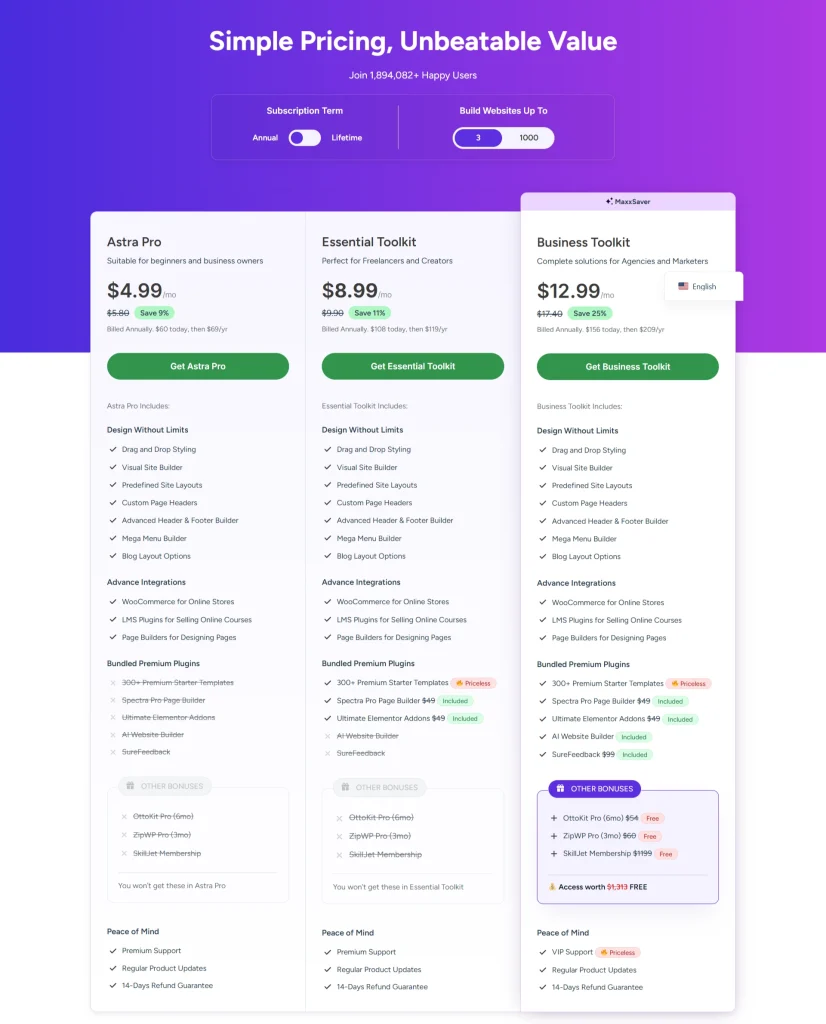
In 2026, Astra offers flexible and affordable pricing designed for every type of website creator. The plans start with Astra Pro at $4.99/month, giving access to premium features, advanced customization, and priority support. For professionals, the Essential Toolkit ($8.99/month) includes Spectra Pro and premium starter templates, perfect for building stunning websites faster.
For agencies and marketers, the Business Toolkit ($12.99/month) provides the ultimate value — combining Astra Pro with powerful tools like SureCart, SureWriter, and ZipWP AI for complete site creation and automation.
All plans include lifetime purchase options and a 14-day money-back guarantee, ensuring risk-free investment. Astra Pro suits individuals, Essential Toolkit fits freelancers, and Business Toolkit is ideal for agencies scaling their web design business.
9: Pros and Cons of Astra Theme (2026)
Pros:
- Extremely fast and lightweight
- Deep integration with all major builders
- 200+ starter templates
- SEO-friendly & accessibility-ready
- Frequent updates and an active community
Cons:
- Free version lacks advanced layout controls
- Some WooCommerce features are Pro-only
- Too many upsells for beginners
10: Who Should Use Astra Theme?
The Astra Theme is designed for all types of WordPress users, from beginners to professionals. Bloggers and content creators love Astra for its lightweight performance, customizable blog layouts, and SEO-friendly design that helps boost traffic. Web developers and agencies benefit from Astra’s speed, clean code, and white-label options, making it perfect for client projects.
Small business owners can easily build fast, professional websites without hiring developers, while WooCommerce store owners enjoy optimized layouts, quick-loading product pages, and better conversions. For beginners, Astra pairs effortlessly with page builders like Elementor and Spectra, offering a true drag-and-drop website-building experience. In 2026, Astra remains the top choice for anyone seeking performance, design flexibility, and simplicity.
11: Conclusion
As we wrap up this Astra Theme Review in 2026 – The Perfect Blend of Speed and Design, it’s clear why Astra continues to dominate the WordPress ecosystem. With its lightweight structure, blazing-fast performance, and seamless compatibility with page builders, Astra stands as a benchmark for modern web design. Its long-term stability, SEO-friendly architecture, and consistent updates make it a reliable choice for bloggers, businesses, and agencies alike.
Whether you’re building your first site or managing multiple client projects, Astra offers a perfect mix of flexibility, ease of use, and professional quality. Experience the difference yourself — Get Astra Theme → and build a faster, smarter, and more stunning WordPress website today.
12: Frequently Asked Questions (FAQs)
Q1: Is Astra Theme free or paid?
Yes, Astra offers both free and premium versions. The free version provides all the essential tools to build a fast, responsive website, while Astra Pro unlocks advanced customization, layouts, and integrations for professionals.
Q2: Does Astra work with Elementor and Spectra?
Absolutely. Astra is fully compatible with Elementor, Spectra, and Gutenberg, allowing seamless design flexibility for both beginners and developers.
Q3: Can I use Astra for WooCommerce stores?
Yes, Astra includes deep WooCommerce integration, offering optimized product pages, fast loading, and conversion-focused layouts.
Q4: Is Astra Pro a one-time payment?
Astra Pro offers both annual and lifetime plans, making it a cost-effective long-term choice.
Q5: How do I import Starter Templates?
You can import templates with a one-click setup wizard inside the Astra dashboard, making website creation quick and effortless.